New Features and Changes
Stay up to date with all the new features and changes within Payments.
Jason Sylvestre
Jul 15, 2026
July 15, 2026
Version 1.0.2 (On the support page)
This update makes Payments more flexible for teams, improves connections with other systems, and smooths out several common invoice workflows.
This summary highlights the changes most relevant to day-to-day use. Other improvements and behind-the-scenes updates have also been made since our last update and are not included here.
Populate Cyber Source with First and Last names correctly.
Previously, the first and last names were just listed on the CS payment form in the first name field. We will break this apart so it populates correctly.
More flexibility for credit card income accounts
Authorized team members can now select an Income Account Override when creating or editing a credit card invoice. The financial segment string can be entered directly or selected with the Finjector CCOA picker, and Payments validates it before the invoice can be saved or sent.
The selected account appears on the invoice details page and is used when the payment is transferred. Changes to the override are also recorded in the invoice history for greater transparency. When an invoice is copied, the override is carried forward only when the person copying it has permission to use this feature.
Better connections with other systems
Invoices created through the API can now include an external system name, record identifier, and link. These details make it easier to connect a Payments invoice with the related record in another application.
When a valid external link is provided, customers can use it to find help or additional context from invoice pages, emails, PDFs, and receipts. Team members can also see the external details from the invoice details page.
Warning! If this feature is used, and a valid URL link is used, the contact information in the invoice may be replaced with that link. Contact technical support before using this feature.
API users have new streamlined options for retrieving invoice status and other essential details, including looking up one or many invoices by external ID. The API documentation has also been expanded with clearer field descriptions, defaults, examples, and validation guidance.
Clearer recharge invoice rejection notices
When a financial approver rejects a recharge invoice, Payments now emails the customer and the team's editors and administrators. The message includes the rejection reason and a direct link to the invoice, helping everyone understand what happened and what may need attention.
Smoother invoice and support workflows
- Zero-balance credit card invoice are now possible with a manual discount.
- Zero-balance credit card invoices are now automatically marked paid and complete when sent, avoiding an unnecessary payment step.
- Receipts now handle manual discounts correctly, including when no coupon was used.
- Team members can add an optional reason when deleting an invoice, and that reason is retained in the invoice history.
- The Support page now displays the current Payments version, making it easier to identify the release when requesting help.
Feb 11, 2022
- Fixed Aging Report to use the due date if available, and if not the created date as resending an invoice caused the values to shift around in the report.
June 17, 2021
- Fixed an issue where a line item longer than 100 characters prevented an invoice from being saved with just a generic message.
- Increased max length to 500 characters, and you can no longer enter more than that maximum.
April 12, 2021
- Some behind the scenes enhancements to emailing and logging.
- If you can mark an invoice as paid, you can now specify a reason that will display on the invoice history.
Feb 5, 2020
- Coupons that expire now have the expiration date shows on invoices and emails so that it is clear to the payer that there could be a time limit.
- A coupon that was used, but now expired will show up on the admin invoice page with the discount amount.
- A coupon that expired before the payer paid will show up as -0.00 so that it is clear that it wasn't used before it expired.
- Totals will now show correctly for coupons that may or may not have expired.
Dec 3, 2019
- Show the account used on the invoice.
Oct 9, 2019
- Fixed some display issues caused by a prior change to make site more mobile friendly.
- Pay button is now centered (previously the preview one was centered, but not the one the users pay with).
- Invoice list takes up more room if the monitor is wide enough.
Oct 7, 2019
- Changed how the download link in emails work. Previously, it would link to a browser page with the pdf in a small window because downloading directly from an email didn't work as expected. Now it will direct them to a download page where they can download the invoice and/or receipt if it has been paid. This looks much like the pay page.
Oct 3, 2019
- Fixed issue preventing attachments from being added to an invoice.
- Coupon details now works (From the list of coupons where you create them)
Sept 24, 2019
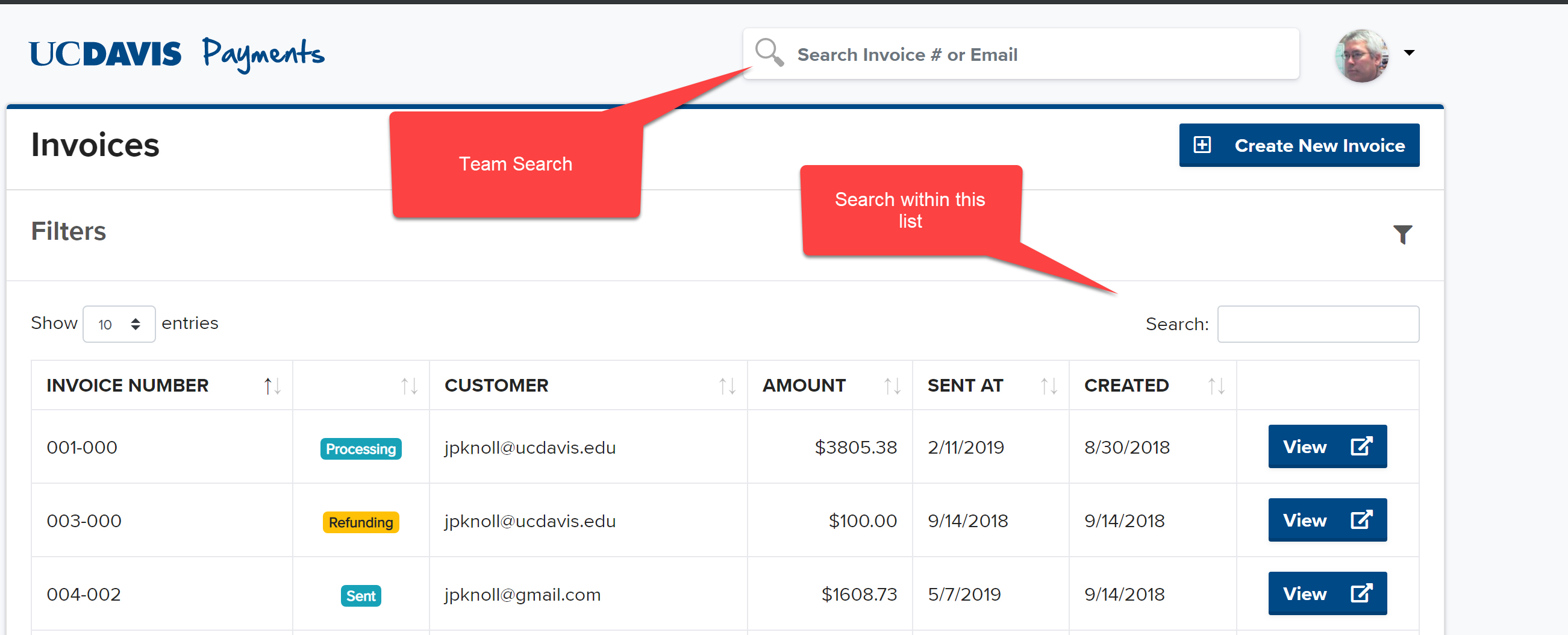
- Fixed the global team search.
- The search can use the invoice number or an email for the customer on the invoice
- Note there are different search boxes:
Sept 23, 2019
- When requesting a refund, a reason must be added.
- Reason will now display in the history of the invoice.
- The history of the invoice now show the person who made the action when available.
Sept 10, 2019
- KFS Description of Funds Distribution and Processing Fee now have the Invoice number added
- Some behind the scenes enhancements
Sept 17, 2019
- Fixed display of dates. Previously, dates were displayed in UTC. Now dates are displayed in Pacific Time.
- Updated when the expiration date for a coupon cuts off. The coupon will remain active until the end of the date that was entered.
- When viewing a sent invoice
- The Invoice and Receipt icons on the buttons have changed to a download.
- Clicking on this will download instead of trying to show the PDF in a browser window. (A small scrolling window in the browser was displayed).
- The list of invoices on the dashboard will display up to 1000 invoices. If you encounter performance problems with this page:
- Let us know with a help ticket.
- Try adjusting the filter in the mean time to show less records
Prior to Sept 17, 2019
- Fixed the issue where sending invoices to multiple customers failed and they had to be individually sent.
- Other enhancements